
📊 Understanding the Reports Feature in Route Simplified
The Reports tool in Route Simplified helps you monitor, export, and analyze collection activity over any time frame. Whether you're tracking completed stops, skipped services, or oil volumes collected — this feature centralizes your data in one place with powerful filtering and customization.
🗓️ Filter by Time Range
You can filter reports using a set of predefined intervals or a custom date range to find exactly what you need:
Options Include:
-
Today
-
Yesterday
-
Last 30 Days
-
Last Month
-
Last Quarter
-
Custom – choose your own start and end dates for precision reporting
This makes it easy to review daily service, audit specific time windows, or generate quarterly summaries.
📋 Customize Columns to Show Relevant Data
The Reports section allows users to toggle columns on and off, so each user only sees the information most relevant to their role.
Click the “Columns” button to reveal this menu:
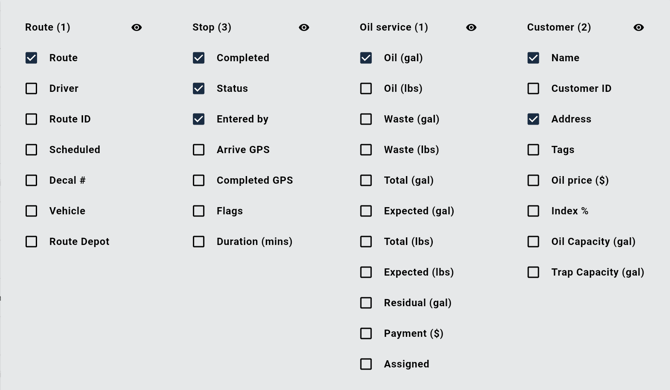
✅ Checked columns = displayed
❌ Unchecked columns = hidden
Click the eye icon to hide/unhide all columns listed underneath that description
📌 Save Your Layout for Future Use
Once your columns are configured, click the three dots located at the top right of the table to access additional report options. To preserve your custom view, click "Save As Default"
Every time you open the Reports page, your preferred columns and layout will automatically load — saving you time and ensuring consistency across reviews and exports.
📁 Export to Excel
After filtering and customizing your data:
-
Click the three dots in the top right of the table
- Click the Download button to instantly download an Excel file of the results
-
Great for audits, client reports, or offline analysis
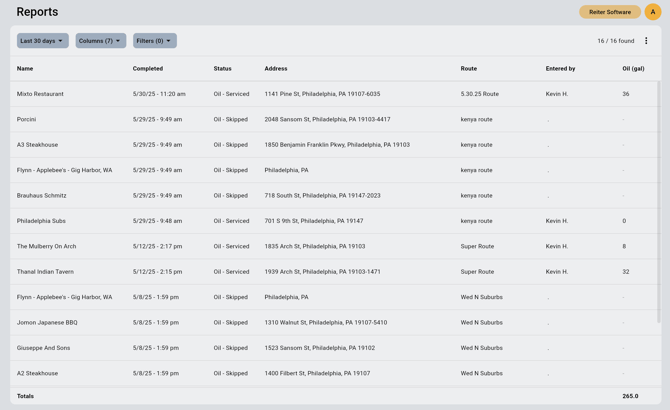
📷 Reports Dashboard Example
Here’s a look at the live Reports page with real-time route data populated:
✅ Key Features
| Feature | Description |
|---|---|
| Time Range Filter | Choose preset or custom date ranges |
| Column Customization | Show only the data your team needs |
| Excel Export | Download filtered results for reporting or analysis |
| Save as Default | Load your preferred layout automatically on every visit |