
📆 Understanding Due Date Calculations Tab in Route Simplified
After navigating to the service specific due date, users will see 3 things.
- A summary of how the current due date is being set
- A dropdown calendar to set a user defined due date
- A selector to set a due date calculation method
User Defined Due Dates
Any manually entered due date overrides the calculated due date. For Interval-based customers, the interval will restart once a new collection is recorded. For Fill Rate customers, the call-in volume is factored into the average of the last 5 collections once a new collection is made. In both cases once a collection is made, the next due date will be calculated based off of the accounts chosen due date type.
Due Date Calculation Method
This is where a user will see the 3 options for due date calculations:
🔧Option 1: ALWAYS Set By User
Due Dates will NOT be calculated by the system, due dates must be entered by the user through the manner described above.
⚠️ This method will not automatically calculate a due, so it should be used when a customer is not in a recurring service contract (e.g service by call-in only).
🔁 Option 2: Service Interval Calculation
The Service Interval method calculates a recurring due date based on a fixed number of days between services.
How it works:
-
You define the service frequency (e.g., every 14 days).
-
The next due date is automatically calculated by adding the interval to the last service date.
-
Best for customers with consistent, predictable output.
Example:
If the last service was completed on June 1 and the interval is 14 days, the next due date will be June 15.
🧪 Option 3: Fill Rate Calculation
Recommended for Oil Collections
The Fill Rate method is a Just-In-Time (JIT) approach that schedules service based on actual usage patterns rather than a fixed calendar.
How it works:
-
Route Simplified calculates the average monthly fill rate based on the last 5 service records.
-
It then projects the next due date by estimating when the onsite capacity will near a user defined percentage of maximum capacity. (e.g Set due date to be the day where 80% of maximum onsite capacity is reached.)
-
This method reduces unnecessary stops and maximizes route efficiency by servicing only when needed.
⚠️ Important: To use the Fill Rate method, the customer location must have an assigned onsite capacity. This enables the system to calculate projected fill percentages accurately.
📌 Why Use Fill Rate for oil collections?
Oil volumes vary by season, usage, and sales volume. The Fill Rate method minimizes excess stops, and unnecessary routes supporting a just-in-time service model that reduces labor and fuel costs.
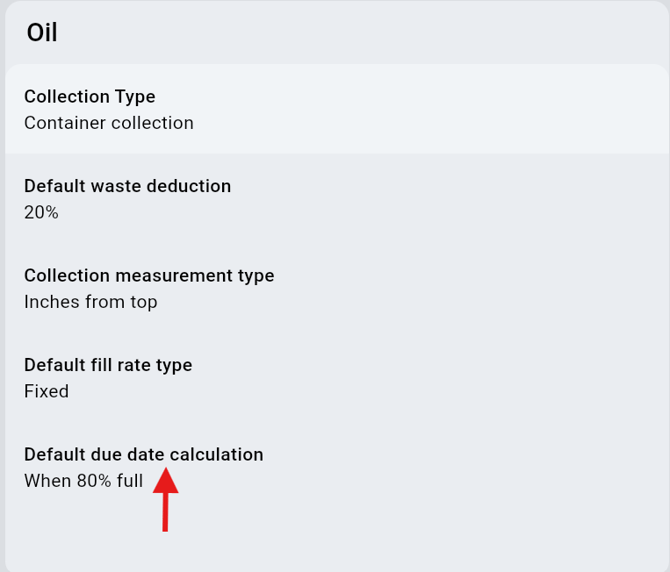
Setting A Default Due Date Calculation
Setting a default due date calculation can be done for each product type through the settings page of Route Simplified. This will apply to any new customer that is added to your account. After choosing a default option users will have the option to apply the defaults to ALL current customers to the preferred due date calculation. This cannot be undone.
✅ Summary Table
| Method | Best For | Based On | Requires Capacity? | Manual Override? |
|---|---|---|---|---|
| Always Set by user | Specific Customer Accommodations | User scheduled due date | ❌ No | ✅ Required |
| Service Interval | Predictable recurring service | Last Service Date + Fixed Interval | ❌ No | ✅ Yes |
| Fill Rate | Optimizing material collected per route | Last Service Date + Avg. Monthly Usage | ✅ Yes | ✅ Yes |